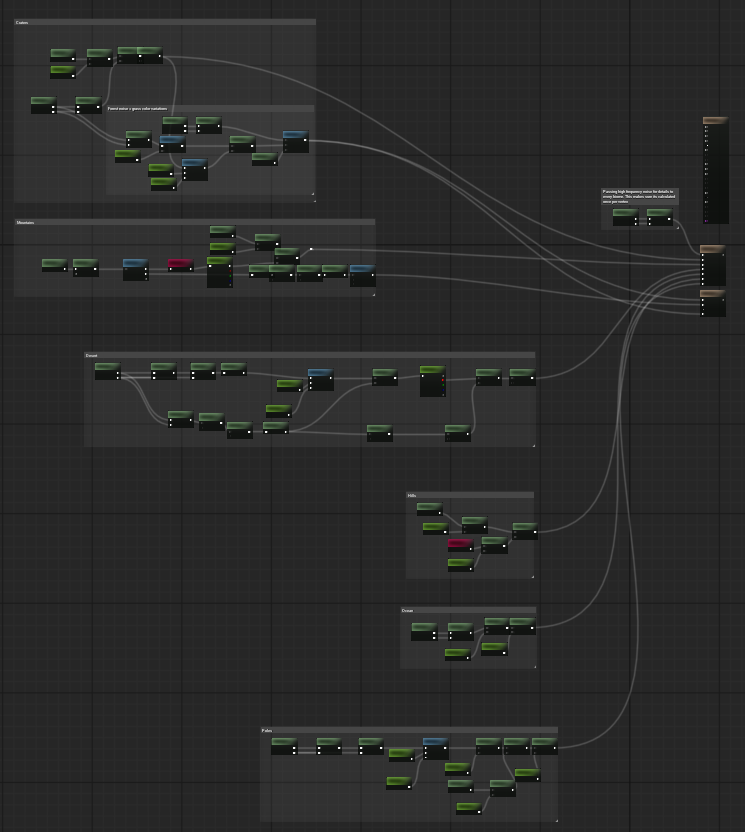
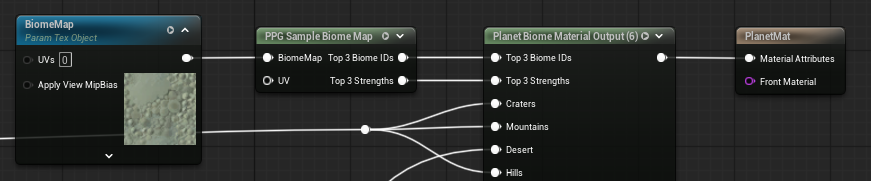
Material Pipeline
PPG uses custom material nodes instead of Unreal Material Layers for planet generation and biome material blending.
Required Materials
A complete planet requires three materials. They are not optional for the normal generation pipeline:
| Material | Required Contents | Purpose |
|---|---|---|
Biome Mask Material |
Exactly one Planet Biome Mask Output node. |
Bakes the planet-wide biome-cell texture. |
Generation Material |
Exactly one Planet Elevation Output and exactly one Planet Vertex Color Output. |
Computes terrain height, per-biome height, normals, biome data, and vertex color data for chunk generation. |
Planet Material |
Runtime surface graph. When using biomes, it uses Planet Biome Map Sample and feeds Planet Biome Material Output. |
Renders generated terrain chunks. |
The rebuild pipeline checks the first two materials strictly. If the biome mask material has zero or multiple Planet Biome Mask Output nodes, or the generation material is missing either generation output node, the rebuild fails.
Pipeline Overview
Biome Mask Materialevaluates the per-biome masks and bakes theBiome Cell Mapstored on the Planet Data asset. Generation Biome stamps are compiled into the planet's composed copy of this map.- For each terrain chunk, the chunk object prepares a grid of vertices for the selected cube-face patch and recursion level.
- The compute shader evaluates the
Generation Materialon that grid. It uses the Planet Data settings and active biome-cell map to compute global height, selected biome heights, blended elevation, normals, slope, biome IDs, biome strengths, and vertex colors. - Candidate terrain stamps apply height operations, material and foliage biome changes, vertex-color overrides, and cutouts. Material + Foliage stamps do not evaluate the target biome's height graph.
- The terrain readback returns modified vertex positions, vertex colors, packed normals, biome indices, slope values, and cutout state. Chunk UVs are generated on the CPU, and per-vertex height is derived from the returned position.
- The chunk builds a runtime static mesh or Nanite mesh from the generated positions, packed normals, UVs, vertex colors, and surviving triangle indices.
- Ray tracing proxy data, water meshes, and visible foliage data are created according to the spawner settings. Collision-grid chunks evaluate the same generation material and compiled stamps through their independent invoker-driven pipeline.
- The visible
Planet Materialis assigned to the terrain mesh. The chunk also creates a per-chunk runtime render target namedBiomeMapand sets it as a texture parameter on that material. - In the surface material,
Planet Biome Map Sampleowns and reads the fixedBiomeMaptexture parameter and outputs the three strongestBiome IDsandStrengths. Planet Biome Material Outputmaps the Planet Data biome IDs to its named entries, then selects and blends the corresponding Material Attributes.Planet Biome Strengthscan expose any of those strengths as named scalar masks for other surface-material logic.
Biome Cell Map and BiomeMap are different resources. Biome Cell Map is the baked Planet Data texture used to choose biomes across the planet. BiomeMap is generated per chunk and is used by the surface material to render the chunk's current biome blend.
Terrain stamps are evaluated after procedural biome-height blending. Their modified positions feed the normal, slope, foliage, collision, Nanite, bounds, and water paths. See Terrain Stamps.
Biome Mask Material
The biome mask material must contain exactly one Planet Biome Mask Output node.
The node has one scalar mask input per biome entry. Later biome layers have higher priority during biome map baking. It also owns Biome Cell Resolution and Biome Cell Seed.
Generation Material
The generation material must contain:
- one
Planet Elevation Output - one
Planet Vertex Color Output
Planet Elevation Output exposes:
Global Height- one height input per biome entry
It also owns biome transition, height-based material blending, and Voronoi warp settings. These values are synchronized into the Planet Data asset's cooked runtime cache by the rebuild pipeline.
Planet Vertex Color Output exposes one vertex color input per biome entry. The resulting vertex colors can be used by terrain materials and by foliage density masks.
Typical generation nodes:
Planet PositionPlanet Position LWCPlanet Texture SamplePlanet NoisePlanet Global HeightPlanet Cell OriginPlanet Cell PositionPlanet Elevation OutputPlanet Vertex Color Output
Surface Material
The surface material is the visible material assigned as Planet Material on the Planet Data asset.
Use Planet Texture Sample to map equirectangular height, color, packed-data, or normal textures across the planet. The node obtains the planet position internally. Surface materials support both regular 2D Texture Objects and Streaming Virtual Texture Objects.
For biome materials, use this graph shape:
- Add
Planet Biome Map Sample. The node owns the fixed texture parameterBiomeMap; no separate texture-object node is required. - Connect its
Biome IDsoutput toPlanet Biome Material OutputinputBiome IDs. - Connect its
Strengthsoutput toPlanet Biome Material OutputinputBiome Strengths. - Connect one Material Attributes graph to each named biome input on
Planet Biome Material Output. - Connect
Planet Biome Material Outputto the material's Material Attributes output.
If the spawner uses Generate Detailed Normals, place Planet Apply Generated Surface Normal between the completed Material Attributes and the material output. It preserves the biome materials' normal-map detail by default. See Generated Surface Normals.
At runtime, every terrain chunk replaces the sample node's BiomeMap parameter with its generated per-chunk texture.
Named Biome Strength Masks
Planet Biome Strengths exposes named 0-1 masks from the same sampled biome data:
- Connect
Planet Biome Map SampleoutputBiome IDstoPlanet Biome StrengthsinputPlanet Biome IDs. - Connect
Planet Biome Map SampleoutputStrengthstoPlanet Biome StrengthsinputBiome Strengths. - Set
Biome Countand add anEntry Namefor each mask required by the graph. - Match each entry name to a biome name in the Planet Data asset.
- Use the named scalar outputs for color, roughness, foliage-style surface effects, or other material blending.
A named output is zero when its biome is not one of the top three contributors at the current pixel or its name does not exist in the active Planet Data asset. When Height Blend Biome Materials is enabled, these outputs represent the height-blended strengths stored in the chunk BiomeMap.
Share one Planet Biome Map Sample between Planet Biome Material Output, Planet Biome Strengths, and the rest of the surface graph. Each separate sample node repeats the biome-map texture loads, accumulation, and sorting. Reusing the same sample keeps that work shared.
Name-Based Pin Synchronization
Biome entry synchronization is name-based.
The Planet Data asset normalizes each biome layer name. Empty names become Biome 1, Biome 2, and so on. The output nodes then match their Entry Names against those normalized Planet Data names.
This means:
- output node and
Planet Biome Strengthsentry names must match Planet Data biome names to sync correctly - pins are not renamed magically unless the node entry names are edited to match
- duplicate names use the first matching output entry
- unmatched Planet Data biomes are mapped to no input for that material output
- the shader supports up to 16 biome entries
Run Rebuild Planet Pipeline after changing biome names, biome order, output node entry names, or linked materials.
Automatic Material Updates
In the editor, linked material recompiles are watched by placed Planet Spawner actors:
- recompiling the
Biome Mask Materialrefreshes the biome map and regenerates the planet - recompiling the
Generation Materialrefreshes generation node maps and regenerates the planet - recompiling the
Planet Materialrefreshes its surface biome mappings when it containsPlanet Biome Material OutputorPlanet Biome Strengths
If a material change does not produce the expected result, run Rebuild Planet Pipeline from the Planet Data asset.
Exposed Runtime Parameters
PPG sets several runtime material parameters on terrain and water dynamic material instances. See Exposed Material Parameters for the full list.